Recalbox drives all of its audio from a single screen: START → SOUND SETTINGS. This section explains what you set there, and covers the less common setups.
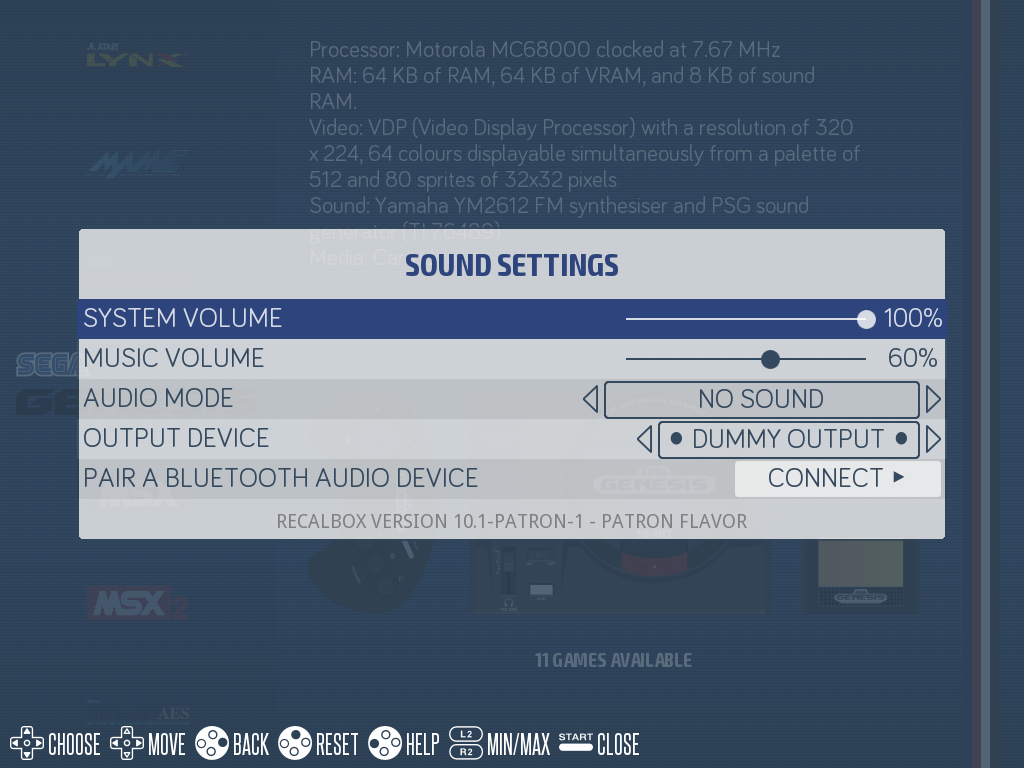
¶ The SOUND SETTINGS menu
| Setting | What it does | recalbox.conf key |
|---|---|---|
SYSTEM VOLUME |
master volume, both frontend and games (0 to 100) | audio.volume |
MUSIC VOLUME |
volume of the frontend background music (0 to 100) | audio.music.volume |
AUDIO MODE |
what you hear in the frontend: music, video sound, both or nothing | audio.mode |
OUTPUT DEVICE |
the output device (HDMI, jack, USB sound card, Bluetooth headset…) | audio.device |
PAIR A BLUETOOTH AUDIO DEVICE |
starts a scan for a Bluetooth headset or speaker | — |
The possible values for audio.mode are musicandvideosound (music and video sound), musiconly (music only), videosoundonly (video sound only), none (no frontend sound at all) and, by default, the value that alternates between music or video sound depending on context.
OUTPUT DEVICElists the devices actually detected by the system. A USB sound card, an I2S DAC HAT or an already paired Bluetooth headset show up there just like HDMI and the jack output — there is nothing to configure by hand.
¶ Tutorials in this section
- Fixing sound issues — choppy sound, crackling, no sound on a given output.
- Analog audio output on a Raspberry Pi Zero 2 — getting analog sound out of a Pi Zero 2, which has no jack socket.
¶ Additional sound cards
Recalbox runs PulseAudio on top of ALSA: any sound card recognised by the Linux kernel automatically becomes an entry in the OUTPUT DEVICE menu.
- USB sound cards: plug and play, nothing to install.
- I2S DAC HATs on Raspberry Pi (HiFiBerry, PCM5102A and compatibles): enable the overlay matching your board in
/boot/recalbox-user-config.txt(for instancedtoverlay=hifiberry-dacplus), then reboot and pick the card inOUTPUT DEVICE. These boards are not officially supported by Recalbox: refer to the manufacturer's documentation for the exact overlay name. - Bluetooth headsets and speakers: use
PAIR A BLUETOOTH AUDIO DEVICEin theSOUND SETTINGSmenu.
The Recalbox RGB DUAL 2, RGB JAMMA and RGB JAMMA 2 boards carry their own I2S audio output, handled automatically by Recalbox — no setting required.