Missing, choppy or distorted sound almost always comes down to one of three things: the wrong output is selected, the volume is at zero, or the sound card's sample rate does not suit it. Here are the checks, in order.
¶ 1. Check the output device and the volumes
Open START → SOUND SETTINGS.
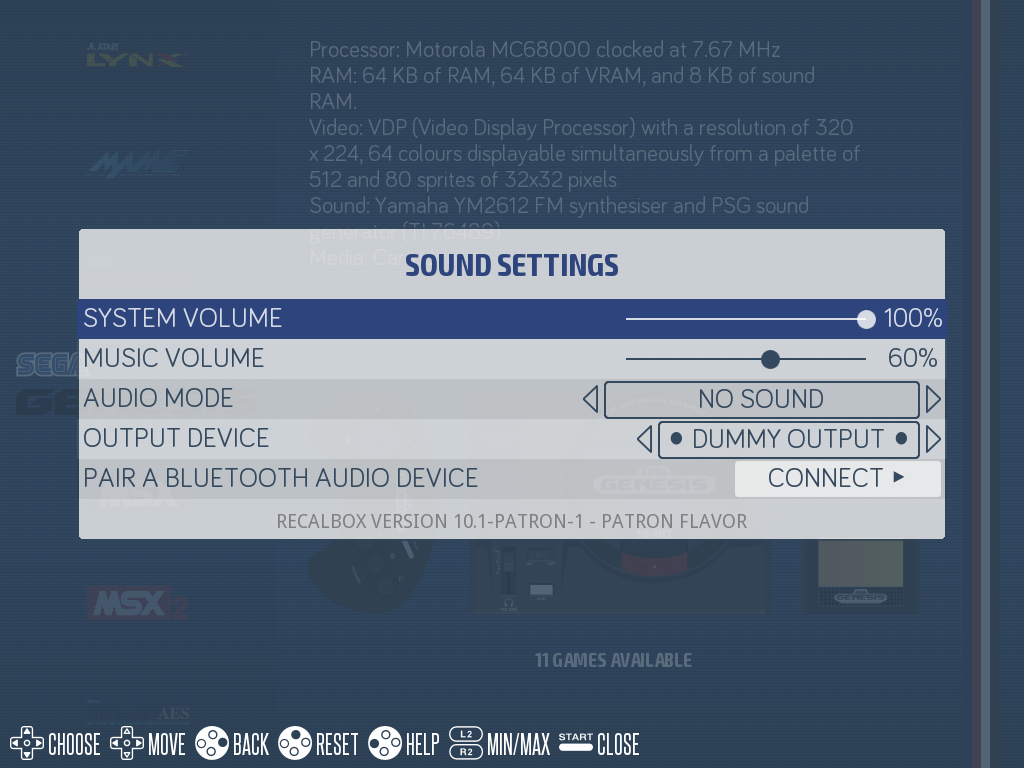
OUTPUT DEVICEmust point at the device you actually plugged in. If the list showsDUMMY OUTPUT, no sound card was detected at all: check the HDMI cable (HDMI audio only shows up once the screen is recognised), or plug in a USB sound card.SYSTEM VOLUMEdrives both the frontend and the games;MUSIC VOLUMEonly affects the background music.AUDIO MODEset toNO SOUNDdeliberately mutes the frontend: hearing nothing in the menus is then expected.
The matching keys in recalbox.conf are audio.device, audio.volume, audio.music.volume and audio.mode.
On a Raspberry Pi, if you want sound on the jack output while an HDMI screen is connected, explicitly select the analog output in
OUTPUT DEVICE: by default, Recalbox favours HDMI.
¶ 2. Choppy, crackling or "metallic" sound
On some sound cards (cheap USB cards, I2S DACs, HDMI/VGA adapters), the sample rate negotiated by PulseAudio does not suit the hardware and the sound breaks up. Forcing 48 kHz nearly always fixes it.
-
Connect over SSH.
-
Run:
mount -o remount,rw / echo 'default-sample-rate = 48000' >> /etc/pulse/daemon.conf -
Reboot.
This change lives in Recalbox's writable system layer: it survives reboots, but it is wiped by every system update. You will have to redo it.
If the crackling persists, try 44100 instead of 48000: some cards only support one of the two rates.
¶ 3. Sound in the frontend but not in games (or the other way round)
Emulators use the same output as the frontend. If sound only comes out on one side:
- check that the game does not carry a configuration override muting audio — the
audio_enable = "false"key in a.retroarch.cfgfile sitting next to the rom; - some cores have their own volume option in the RetroArch menu (
HOTKEY+B); - on computer systems and standalone emulators, missing sound often comes from the emulator itself: try another core from the game menu.
¶ 4. Bluetooth headset or speaker
Pair the device from SOUND SETTINGS → PAIR A BLUETOOTH AUDIO DEVICE, after putting it in pairing mode. Once paired, it appears in the OUTPUT DEVICE list.
A gap between picture and sound is normal over Bluetooth (codec latency): for gaming, prefer a wired connection or a low-latency Bluetooth transmitter.
¶ 5. Still nothing
Collect the troubleshooting information and come and talk about it on the Recalbox Discord, stating your machine, your screen and the output device you use.