The support archive is a single file gathering the whole context of your Recalbox: version, configuration, logs, detected hardware, controllers, emulator settings… It is the file to provide when asking for help on the Recalbox Discord: it saves half an hour of back-and-forth questions.
¶ Before generating the archive
For the archive to be genuinely usable:
- Enable debug mode (
START→ADVANCED SETTINGS→ACTIVATE DEBUG/VERBOSE LOGS); - reproduce the problem;
- generate the archive right after, without rebooting in between.
¶ Generating the archive
¶ From the web manager
Open the web manager in a browser (http://recalbox.local). At the bottom right of the page, a round button unfolds the actions menu: pick Support archive. Generation takes a moment, then a download link appears and your browser fetches the archive.
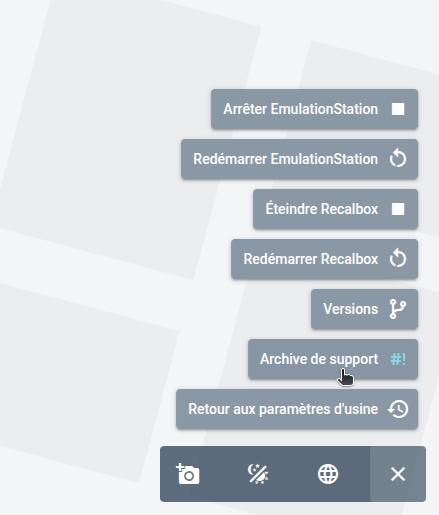
The same menu holds Versions, Reset to factory settings and the EmulationStation / Recalbox restart commands.
¶ Over SSH
Connect over SSH and run:
/recalbox/scripts/recalbox-support.sh
The script prints the path of the resulting file once it is done.
Either way, the archive is named recalbox-support-<date>.tar.gz and dropped in the share/saves folder, reachable through the network share.
¶ What the archive contains
The script notably collects:
- the Recalbox version and architecture, your
recalbox.confand the boot files (recalbox-boot.conf,recalbox-user-config.txt, boot and update logs); - every log from
share/system/logs, plus/var/log/messagesand the Bluetooth log; - the system state:
dmesg,lsmod,lsusb,lspci, processes, memory, free space, mounted disks, network (connman, interfaces), audio (ALSA, PulseAudio), display (output EDIDs, Xorg); - the controllers: list of input devices,
evtestandudevadminformation for every event,es_input.cfg; - the emulator configuration (
share/system/configs), the system list, the list of installed themes, an approximate rom count, and the Kodi and LIRC logs.
Your games and saves are not included.
The archive may contain secrets — send it in a private message, never in a public channel. The script does mask the Wi-Fi key, the patron private key and the RetroAchievements / ScreenScraper credentials in
recalbox.conf, but the archive also shipsrecalbox-backup.conf, a full copy of that same file, which is not filtered. The root password is masked nowhere.
¶ Afterwards
Once the archive is sent, disable debug mode to get normal performance back.
For one-off diagnostic commands (a controller that is not detected, a silent USB dongle…), see Collecting system information.