A Recalbox microSD card (or drive) holds several partitions. Two of them are readable by Windows:
| Partition | Format | Contents |
|---|---|---|
RECALBOX |
FAT32 | The boot partition: recalbox-boot.conf, recalbox-user-config.txt, config.txt |
SHARE |
exFAT | Your games, bios files, saves and configuration (system/recalbox.conf) |
Sometimes Windows only shows one of them — usually SHARE, the one holding the games. The card is not faulty: Windows simply failed to assign it a drive letter.
¶ Prerequisites
- Your Recalbox has booted at least once: that first boot is what creates the
SHAREpartition. On a freshly flashed card, it does not exist yet. - The storage device is plugged into your PC and Windows is running.
¶ Assigning a drive letter
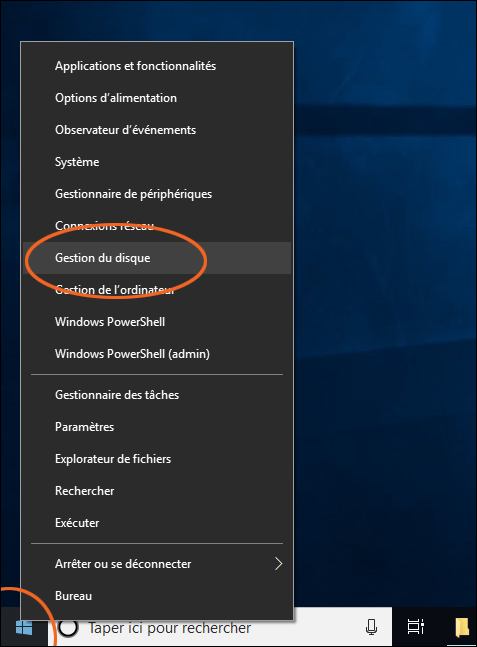
- Right click the Start button and choose
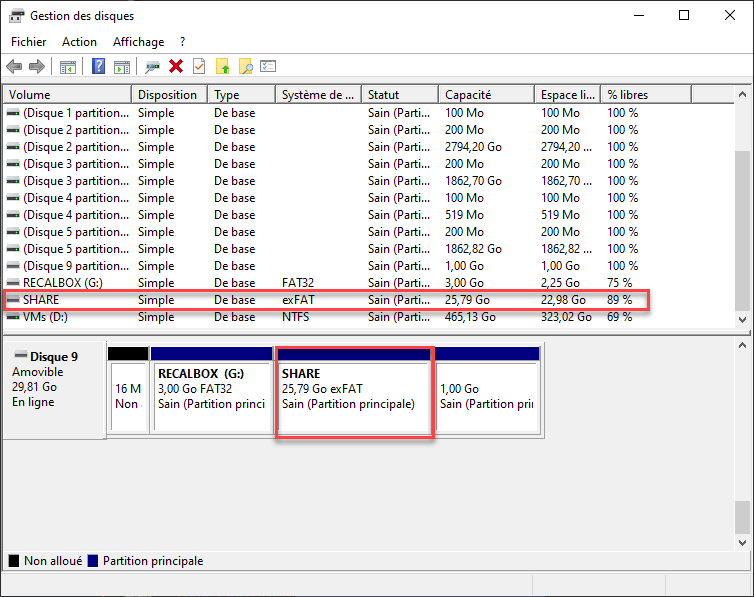
Disk Management. - In the lower part of the window, find the disk matching your card and its partitions:
RECALBOXandSHARE. - Right click the partition that does not show up in File Explorer, then choose
Change Drive Letter and Paths…. - Click
Add…, let Windows suggest a free letter, and confirm withOK.
The partition appears in File Explorer straight away.
Never format a partition from this screen, and never delete a partition: you would lose either your games or the Recalbox's ability to boot.
¶ If the partition is not even listed in Disk Management
- Try another card reader or another USB port: card readers built into laptops are often unreliable with high-capacity cards.
- Make sure the Recalbox finished its first boot (the system selection screen appeared).
- If your data is on external storage, that is the device you need to plug in, not the microSD card.
¶ The network is still the easiest route
You do not need to take your Recalbox apart to reach your files: the network share is open by default. Type \\RECALBOX in the Windows Explorer address bar — see File management.