You can store your games and personal data on a USB device (stick, self-powered external drive…) instead of the SD card.
The big advantage: the system (SD card) and your data (USB device) are kept separate. If you ever reinstall, you lose nothing — plug the device back in, select it, play.
¶ 1. Pick the right format
Your device must be formatted as exFAT (recommended), FAT32, EXT4 or NTFS.
| Format | Max. file size | Readable on Windows | Note |
|---|---|---|---|
| exFAT | unlimited in practice | ✅ | Recommended |
| FAT32 | 4 GB | ✅ | A blocker for large games (ISO…) |
| NTFS | unlimited in practice | ✅ | Slow transfers on Recalbox |
| EXT4 | unlimited in practice | ❌ | Linux only |
Recalbox does not format your device — format it from your computer before you start.
¶ 2. Activate the device
- Start Recalbox and wait for the interface.
- Plug in your USB device.
- A message asks what to do with it: choose
INITIALIZE. - Recalbox creates the roms folder structure on the device.
- Once the completion message is displayed, you can copy your games onto it (directly from your computer, or over the network).
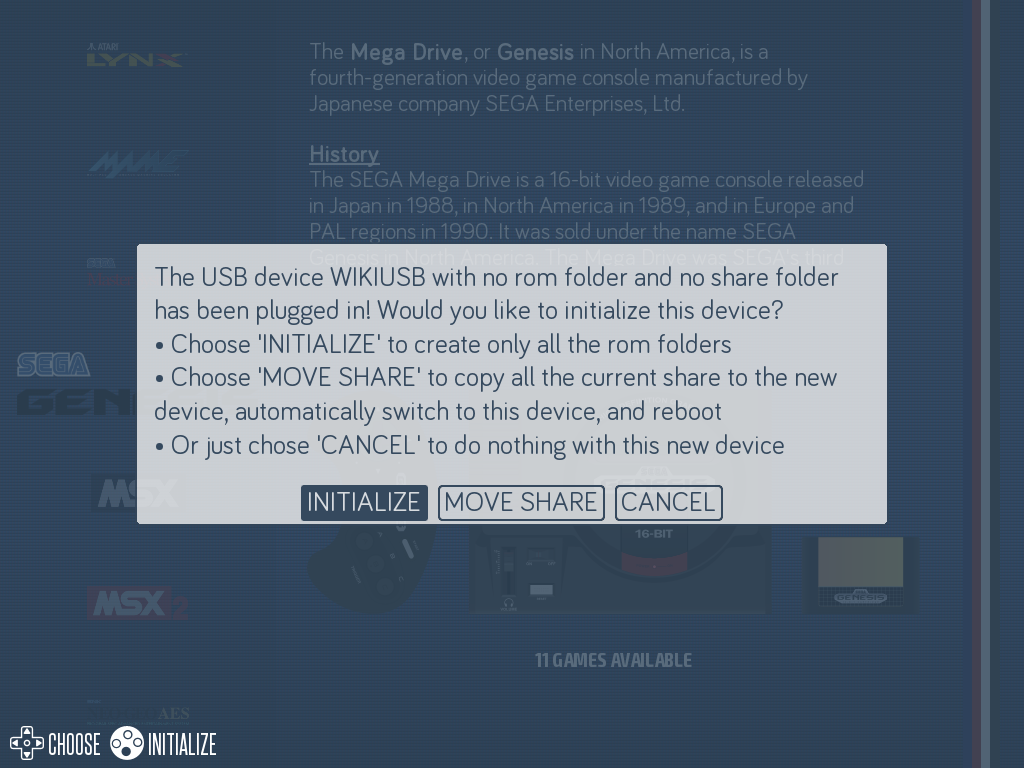
¶ Moving the whole share to the device
The initialisation described above leaves the system and its configuration on the installation medium and only puts your games on the device. You can also move the whole share — roms, bios, saves, music, screenshots, emulator configurations — onto the device of your choice, from MAIN MENU → SYSTEM SETTINGS → AVAILABLE STORAGES.
Recalbox then writes the chosen device into the sharedevice directive of /boot/recalbox-boot.conf and reboots.
¶ What to know: a reinstall undoes the move
recalbox-boot.conf lives on the boot partition, the one you overwrite when reflashing the image. After a reinstall the sharedevice directive is back to its factory value (INTERNAL): the share is on the installation medium again, and you have to redo the move.
The trap: your data has not moved, and the device still holds a complete share tree. Recalbox then mounts it as an additional share — your games reappear in the interface, which gives the impression everything still works. It does not: the share actually in use is the one on the installation medium, and your new saves, screenshots and configurations will be written there.
Nothing is broken and there is nothing to repair by hand: simply redo the move from AVAILABLE STORAGES. It is exactly the same situation as after any reinstall.
¶ Troubleshooting — the drive is not detected
Some hard drives are too slow to spin up at boot: Recalbox then falls back to the SD card. The fix is to tell it to wait for the drive:
- Connect over SSH.
- Remount the boot partition as writable: see the procedure.
- Edit the file:
nano /boot/recalbox-boot.conf - Add the line:
sharewait=30(value in seconds). - Save (
Ctrl+X,Y,Enter) then typereboot.
Storage is not a performance lever. Moving the share or only putting roms on the device amounts to the same thing in that respect, and a game does not run better from an SSD than from the SD card. Splitting simply means depending on the performance of two devices instead of one.