Recalbox plays background music in its menus. You can replace it with your own: just drop audio files into a dedicated folder.
¶ Dropping in your files
Copy your music into the share/music folder of your Recalbox, reachable through the \\RECALBOX\share\music network share or directly on the SD card (SHARE/music/) — see File management.
You may organise your tracks into subfolders: Recalbox walks the whole music folder, however deeply nested.
No reboot is needed: the next track will be picked from your selection, at random.
¶ Supported formats
The common formats are supported, along with tracker music formats:
.mp3 · .ogg · .opus · .flac · .wav · .mid / .midi · .mod · .s3m · .xm · .it · .669 · .amf · .dsm · .far · .gdm · .imf · .med · .mtm · .okt · .stm · .stx · .ult · .uni · .apun
Files in any other format are simply ignored.
¶ What your music replaces
As soon as share/music holds at least one readable track, it becomes the priority source for background music. Recalbox picks its music in this order:
- your music (
share/music); - the patron playlist, for Patreon supporters;
- the music defined by the theme for the displayed system;
- the music files in the theme's music folder.
A useful corollary: if you are a patron and you cannot hear the Jukebox mixtapes,
share/musicis probably not empty. Empty it to let the patron playlist take over.
¶ The related sound settings
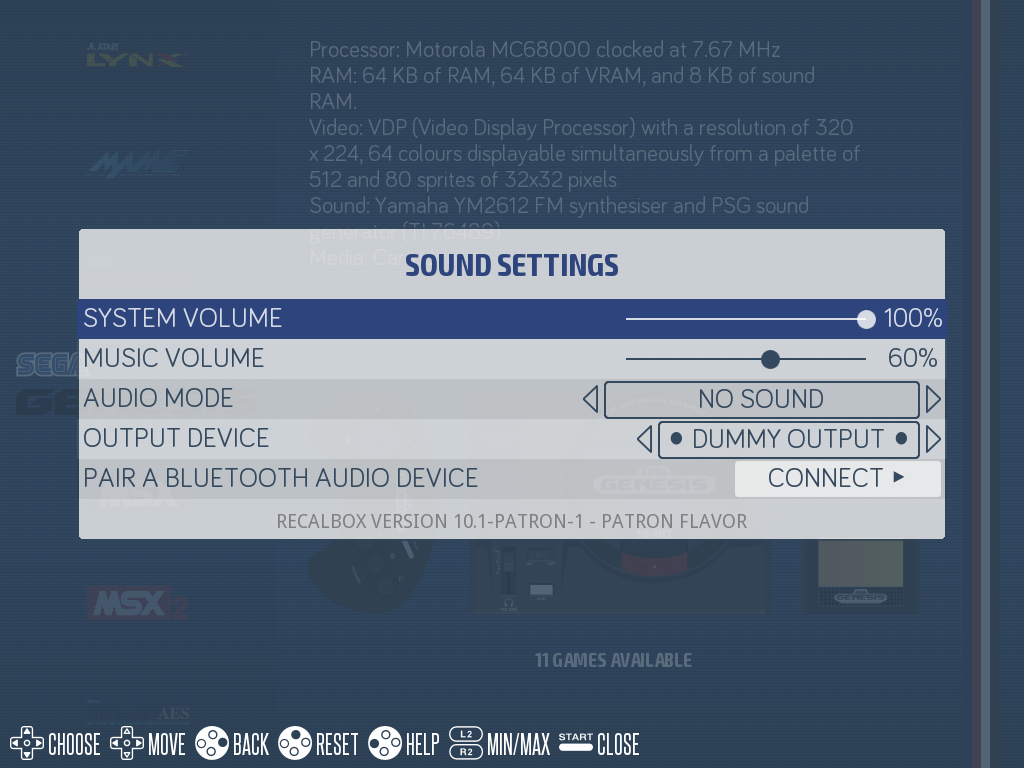
START → SOUND SETTINGS:
MUSIC VOLUME: the background music volume, independent from the master volume;AUDIO MODE: what the interface is allowed to play —Musics or videos sound(music pauses while a game video plays),Musics and videos sound,Musics only,Videos sound only, orNo sound.
Under START → USER INTERFACE SETTINGS, the SHOW MUSIC POPUPS option controls the notification announcing each new track.
¶ See also
- Jukebox — the exclusive mixtapes reserved for patrons and their dedicated player.
- Adding themes to the interface — themes often ship with their own music.