The Jukebox, new in Recalbox 10.1, plays exclusive mixtapes reserved for patrons (Recalbox Patreon supporters) as background music. Tracks are downloaded from the Recalbox servers, cached locally, then played automatically in the EmulationStation menus. A dedicated screen lets you browse the mixtapes, play a specific track, enable/disable titles and follow what is currently playing.
The Jukebox is a patron feature: the menu entry only shows up when your Recalbox is connected to an active patron account (see below).
¶ Enabling your patron status
-
Generate your patron private key on recalbox.com/patreon.
-
Set it in
recalbox.conf:patron.privatekey=YOUR_KEY -
Reboot: on startup, Recalbox checks the key online and shows a welcome message (
Welcome back %NAME%! Patron level %LEVEL%…). All patron features, including the Jukebox, are then unlocked.
An Internet connection is required for authentication and track downloads (the playlist and already-downloaded tracks remain usable from the local cache).
¶ Patron music as background music
Once your patron status is confirmed and the playlist retrieved, the playlist tracks play automatically as background music in the menus, with nothing to configure. Each new track shows a notification: Now playing: <title> (<mixtape> by <artist>).
A few priority rules worth knowing:
- If you put your own music in
/recalbox/share/music, it stays prioritized over the patron playlist for automatic playback. Empty that folder to hear only the patron mixtapes. - A playing patron track is never interrupted by another music source (theme music, etc.).
- To disable only the automatic patron playlist playback, set
music.remoteplaylist.enable=0inrecalbox.conf(enabled by default).
¶ Skipping to the next track: HOTKEY + R1
On the system list, the HOTKEY + R1 shortcut (new in 10.1) stops the current background music and skips to the next track — handy to zap a title without opening the Jukebox.
In game lists,
HOTKEY+R1jumps to the next list section instead: music skipping is done from the system list (or from the Jukebox).
¶ Opening the Jukebox
Press START to open the MAIN MENU, then enter JUKEBOX (OPEN). The entry is only visible to patrons.
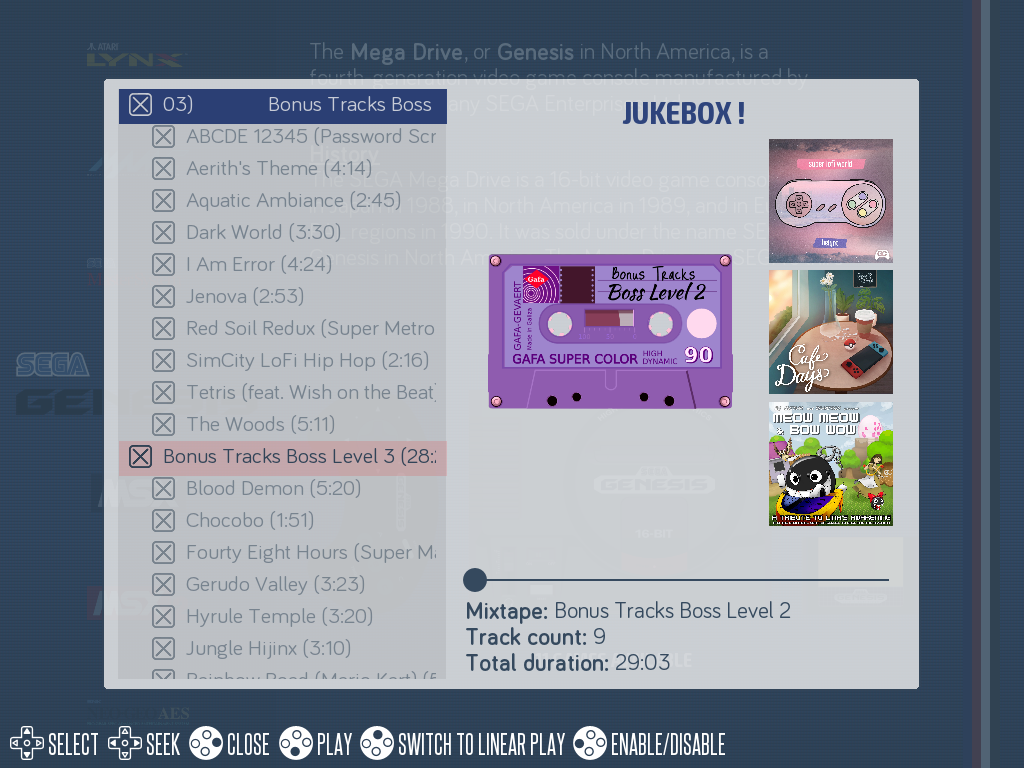
The JUKEBOX ! screen shows:
- on the left, the track list grouped by mixtape (one header per mixtape with its total duration), with a checkbox per title and a play icon on the current track;
- on the right, the artwork (mixtape and album pictures) and the details of the selected track (
Author:,Album:,Duration:) or mixtape (Mixtape:,Track count:,Total duration:); - at the bottom, the current title (
Now playing: …) and a position bar within the track (replaced by a progress bar during a download).
¶ Controls
| Control | Action |
|---|---|
UP/DOWN (SELECT) |
Browse tracks (disables auto-follow) |
LEFT/RIGHT (SEEK) |
Seek within the current track (±10 s, hold for continuous seeking) |
A (PLAY) |
Download then play the selected track |
Y (ENABLE/DISABLE) |
Tick/untick the track — on a header, the whole mixtape |
X (SWITCH TO RANDOM PLAY/SWITCH TO LINEAR PLAY) |
Toggle between random play (default) and mixtape-order play |
START (FOLLOW) |
Jump back to the playing track and re-enable auto-follow |
B (CLOSE) |
Close the Jukebox |
Unticked tracks (via Y) are excluded from automatic playback; your selection is remembered across reboots, as is the playlist position. The play mode goes back to random on every startup.
¶ Cache and disk space
Tracks are downloaded as playback goes (up to 10 titles pre-cached ahead) and kept in a local cache on the system partition — your game shares are not used. The cache cleans itself up: when space runs low, the oldest files are deleted first. No maintenance is needed.
¶ Frequently asked questions
I'm a patron but the JUKEBOX entry does not show up? Check that patron.privatekey is set in recalbox.conf, that your Recalbox has Internet access at startup, and that your Patreon status is active. If the key is invalid, a message invites you to generate a new one on recalbox.com/patreon.
How do I mute the patron music without losing the other perks? Set music.remoteplaylist.enable=0 in recalbox.conf: the remote playlist will no longer play automatically.
Why don't I hear the patron mixtapes? If the /recalbox/share/music folder contains music files, they take priority for automatic playback. You can still play a patron track manually from the Jukebox (A — PLAY).
A track won't start / download error? Tracks are downloaded on demand: if the download fails (network), an error message shows up — try again a bit later.