Xin-Mo USB interfaces work natively with Recalbox and handle two players. There is no driver to install and no file to edit.
Older Xin-Mo boards presented themselves to the system as a single device covering both players, which forced you to configure player 1 only. Recalbox now ships the USB HID fixes for the Xin-Mo 18 pin and Xin-Mo 2 players 20 pin interfaces: both players are seen as two independent controllers, and each is configured normally.
¶ Typical wiring
Take a panel with 6 buttons + joystick + one credit button (SELECT) + one START button (the usual "1 player" and "2 players" buttons), laid out like this for each player:
. ↑     Ⓨ Ⓧ Ⓛ
←  →    Ⓑ Ⓐ Ⓡ    ($) (1P)
  ↓
Adding a dedicated Hotkey button (Ⓗ) is recommended: it is what gives access to the in-game shortcuts (quit, save state, RetroArch menu…). Otherwise, the Hotkey usually lands on the credit button.
You can map both players identically, but nothing forces you to.
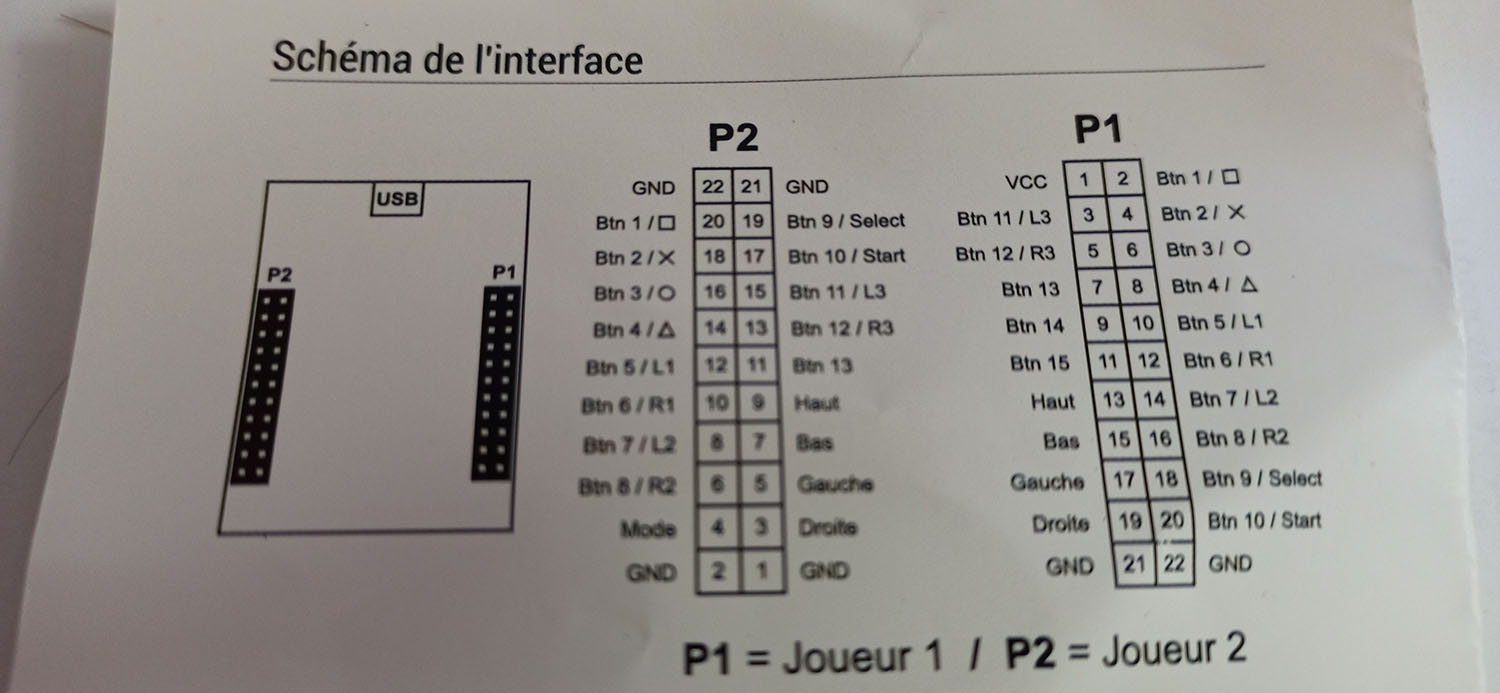
¶ Configuring in Recalbox
Once the panel is wired and the interface plugged in over USB:
- Recalbox detects two new controllers and offers the visual configurator. You can also start it on demand from
START→CONTROLLER SETTINGS→CONFIGURE A CONTROLLER. - At the controller type step, pick the arcade stick artwork matching your panel — 4, 6 or 8 buttons.
- Press the buttons in the order shown on screen. For a button your panel does not have (L2, R2, stick clicks…), press
RIGHTto skip it. - Repeat for player 2.
Then check the result with TEST A CONTROLLER — see Testing a controller.
If your Xin-Mo interface still exposes a single player, note its USB ID over SSH with
lsusband report it on the Recalbox Discord: the fix can be extended to your model.