"Video snaps" are short gameplay clips displayed in your game lists: a few seconds after selecting a game, its video starts playing in place of the scraped image, plays through, then the image comes back. Perfect to remember a game at a glance before launching it.
📷 Screenshot coming soon:
videosnap-gamelist.png
¶ Getting the videos
Videos are downloaded by the internal scraper: in the scraper options, set SELECT VIDEO TYPE to Optimized video (RECOMMENDED) or Original video (the default setting, No video, downloads no video), then run a scrape.
Each video is stored in the media/videos/ subfolder of the system's rom folder, and referenced by the video tag of the gamelist.xml. You can also scrape from a PC with the Skraper software: videos are displayed the same way as long as they are referenced in the gamelist.xml.
Videos quickly take up space, despite their good MP4 compression (count 1 to 6 MB per game depending on the system). To scrape videos for a large collection, plan your storage accordingly — the
Optimized video (RECOMMENDED)is lighter than theOriginal video.
¶ How the video is displayed
Nothing to enable: as soon as a game has a video, it plays automatically in the game list views that display visuals. With the default theme:
- the video starts after 2 seconds on the selected game;
- it plays once, then fades out and the game's image comes back;
- moving to another game stops the video.
The delay and the number of plays are set by the theme (delay and loops properties of the video element) — some themes therefore loop the video or start it immediately.
The old
emulationstation.videosnaps.delay,emulationstation.videosnaps.loopandemulationstation.videosnaps.soundkeys ofrecalbox.confare no longer honored: the behavior now depends on the theme and on theAUDIO MODEbelow.
¶ Video sound
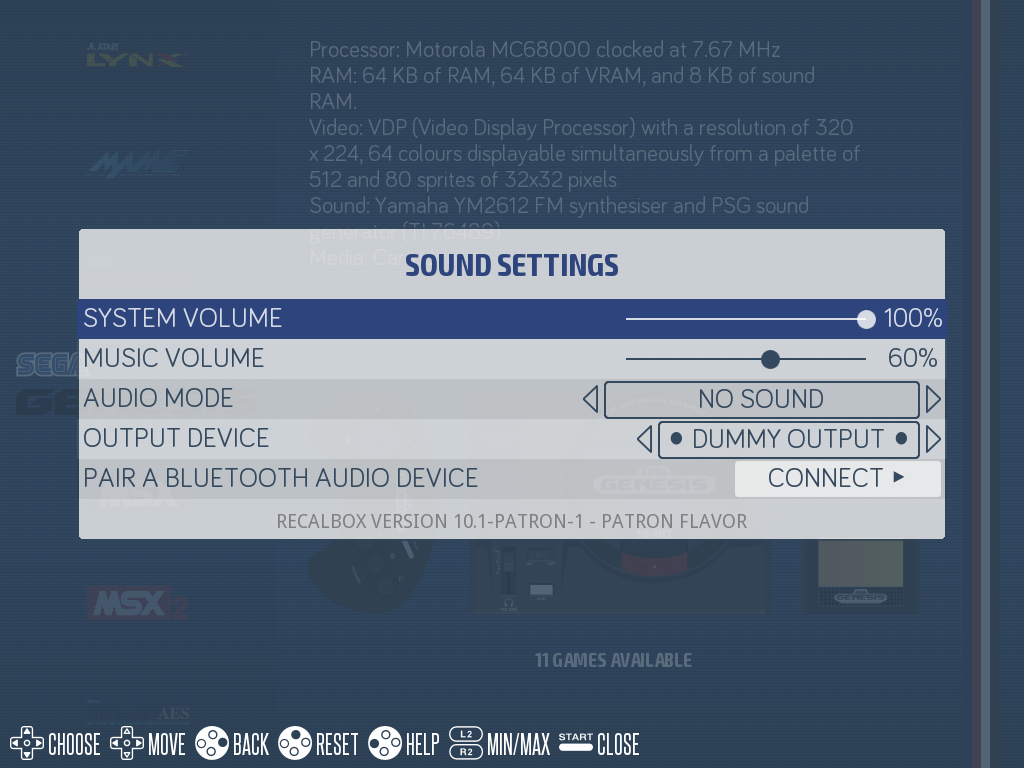
Video snap sound is controlled by the AUDIO MODE:
- Press
STARTto open theMAIN MENU, then enterSOUND SETTINGS. - Set
AUDIO MODEto your preference:
| Choice (default in bold) | Behavior |
|---|---|
MUSICS OR VIDEOS SOUND |
the frontend music pauses while a video plays its own sound |
MUSICS AND VIDEOS SOUND |
music and video sound at the same time |
MUSICS ONLY |
muted videos |
VIDEOS SOUND ONLY |
no frontend music |
NO SOUND |
neither music nor video sound |
¶ Videos are used elsewhere too
The game clips screensaver chains the videos of your scraped games as a screen saver.
¶ Frequently asked questions
The video does not start on my game? The game probably has no video: check the video type in the scraper options (No video by default) and run a scrape again. Also wait through the 2-second delay on the selected game.
The videos are muted? Check the AUDIO MODE in SOUND SETTINGS: with MUSICS ONLY or NO SOUND, videos play without their sound.
Can I loop the video or change the delay? Not from the menus: this behavior is defined by the theme in use.