The scraper downloads metadata and visuals for your games (description, release date, image, video, logo, box, manual…) from an online server, and fully enhances your game lists in EmulationStation.
Recalbox 10.1 ships a complete scraper overhaul:
- Logos are now always retrieved, with a choice of style (Clear, Carbon, Steel, marquees, SteamGrid).
- Boxes (cases) are now always retrieved, with a 2D or 3D choice.
- New downloadable "Tips & Tricks" files.
- The thumbnail is gone: this media is obsolete, themes that used it now display the base image instead.
- Logos, boxes, maps and manuals are now all referenced in
gamelist.xml— no more "orphan" media.
¶ Running a scrape
- Press
STARTto open theMAIN MENU, then enterSCRAPER. SCRAPE FROM: pick the server.ScreenScraperis the recommended choice (based on www.screenscraper.fr, game data in your language when available).FILTER:Only missing image(default) only processes games without an image,All Gamesre-scrapes everything.SYSTEMS: tick the systems you want to scrape.SCRAPE NOW→RUN: the scrape starts and shows its progress (SCRAPING IN PROGRESS, current game, elapsed and estimated time).
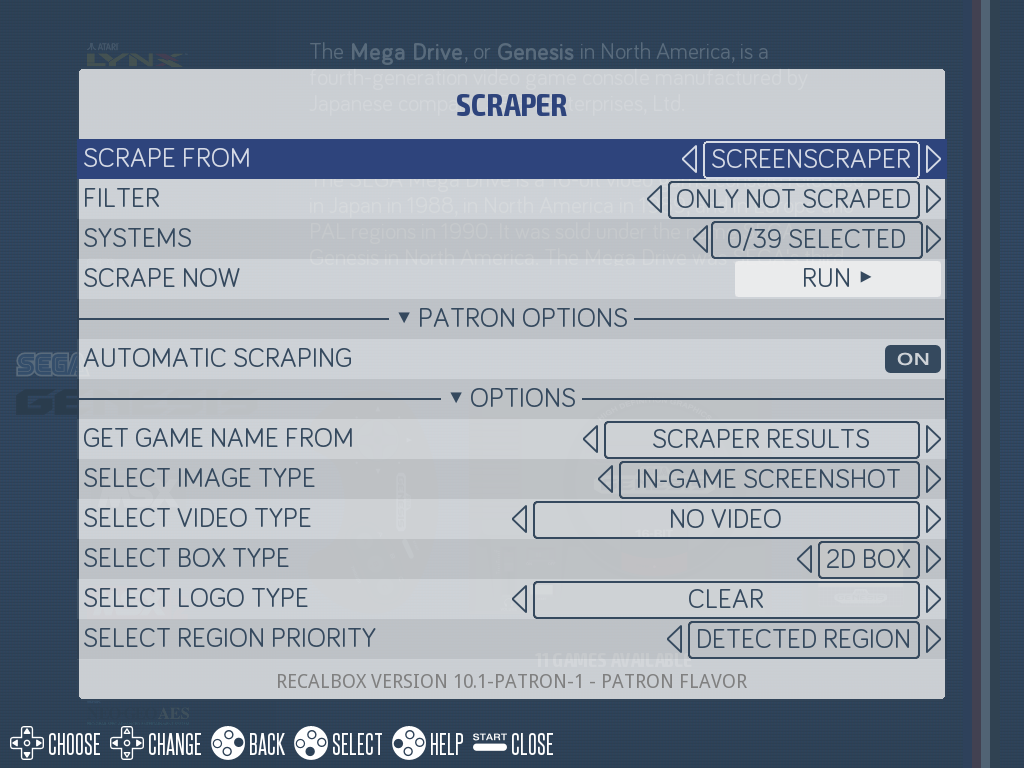
While scraping, the RUN IN BACKGROUND button lets you keep using Recalbox; return to the scraper menu to get the progress back. STOP interrupts cleanly (progress is saved).
You can also scrape a single game: in a game list, open the game's edit menu, Scraping section, then SCRAPE → RUN.
¶ The options
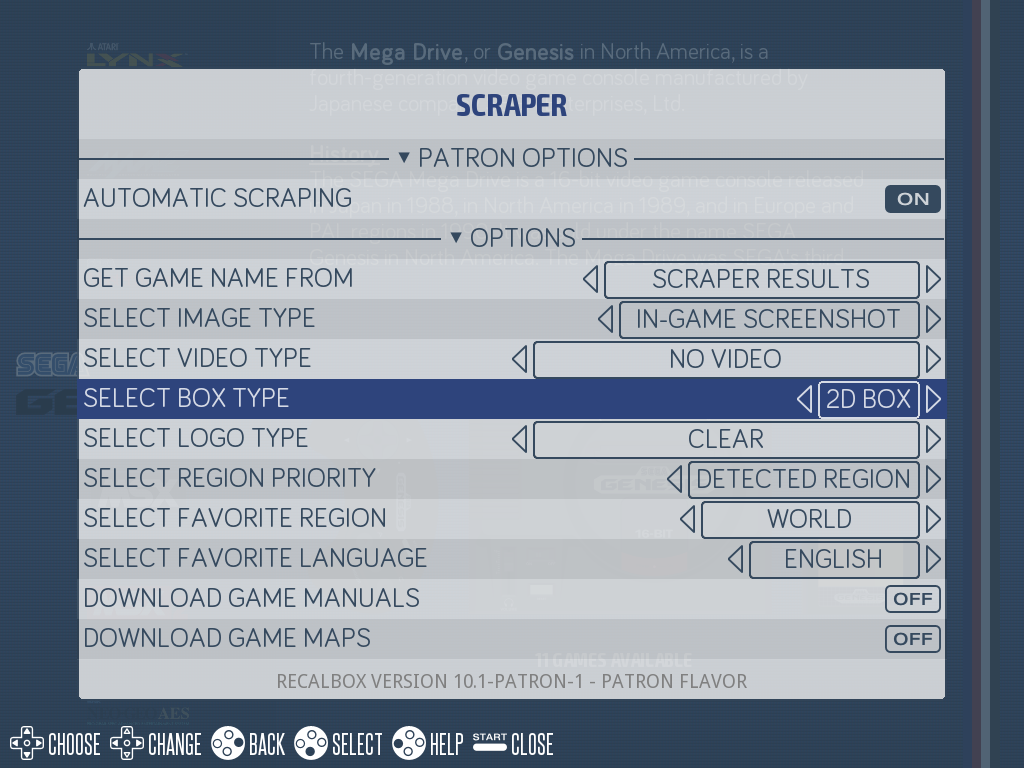
In the SCRAPER menu, under OPTIONS:
| Option | Choices (default in bold) |
|---|---|
GET GAME NAME FROM |
Scraper results, Raw filename, Undecorated filename |
SELECT IMAGE TYPE |
In-game screenshot, Title screenshot, ScreenScraper Mix V1, ScreenScraper Mix V2 |
SELECT VIDEO TYPE |
No video, Optimized video (RECOMMENDED), Original video |
SELECT BOX TYPE |
2D Box, 3D Box |
SELECT LOGO TYPE |
Clear, Carbon, Steel, Short Marquee (2:1), Long Marquee (4:1), SteamGrid (composite logo) |
SELECT REGION PRIORITY |
DETECTED REGION, FAVORITE REGION |
SELECT FAVORITE REGION |
region list |
SELECT FAVORITE LANGUAGE |
language list |
DOWNLOAD GAME MANUALS |
switch |
DOWNLOAD GAME MAPS |
switch |
DOWNLOAD TIPS & TRICKS |
switch |
INSTALL PAD-2-KEYBOARD CONFIGURATIONS |
switch |
USERNAME / PASSWORD |
your ScreenScraper account credentials |
¶ Downloaded media (new in 10.1)
All media land in the media/ folder of the system's rom folder, and are referenced in its gamelist.xml:
| Media | Subfolder | gamelist tag | Notes |
|---|---|---|---|
| Main image | images/ |
image |
depends on the chosen type (screenshot or Mix) |
| Box | boxes/ |
box |
new dedicated field — 2D or 3D, your choice |
| Logo | wheels/ |
logo |
new dedicated field — style of your choice (Clear, Carbon, Steel, marquees, SteamGrid) |
| Video | videos/ |
video |
optimized or original |
| Manual | manuals/ |
manual |
PDF, readable in the manual browser (START menu of a game list) |
| Maps | maps/ |
maps |
several maps possible per game |
| Tips & Tricks | tipsandtricks/ |
tips |
new — tips and tricks for the game |
- The
Clearlogo style is ScreenScraper's "clear logo" (wheel);CarbonandSteelare its textured variants;SteamGridis a composite logo. - Manuals, maps and Tips & Tricks can be read directly on the Recalbox through the dedicated browser, available from the
STARTmenu of game lists. - The thumbnail no longer exists: nothing to do on your side, themes that used it are automatically redirected to the base image.
¶ ScreenScraper: account and limits
The scraper queries ScreenScraper. Create a (free) account on the website, then fill in USERNAME and PASSWORD in the scraper options: Recalbox then uses your account's limits (number of simultaneous downloads, daily request quota).
If you hit your daily quota, the scraper stops and everything already retrieved is saved. Simply start again the next day, keeping the filter on Only missing image to resume where you left off.
Patrons: the Recalbox scrape server. Patreon supporters get a
Recalboxserver underSCRAPE FROM— a mirror of ScreenScraper hosted by the project. There is no account to create and no credentials to enter, and no daily quota to keep an eye on: the servers are sized to scrape thousands of games in a few minutes, where a free ScreenScraper account forces you to spread a large scrape over several days.The second extra is
AUTOMATIC SCRAPING(PATRON OPTIONS): games scrape themselves as you browse your lists, without ever starting a full scrape.To get both: become a patron.
¶ Frequently asked questions
The scraper stopped with a quota message, did I lose my scrape? No — everything scraped today is saved. Start again tomorrow with the Only missing image filter.
My logos/boxes scraped before 10.1 don't show up? Logos and boxes are now dedicated fields in gamelist.xml. Run a new scrape (Only missing image first, or All Games to regenerate everything) to fetch and reference them.
Can I keep using Recalbox while it scrapes? Yes: RUN IN BACKGROUND hands control back, and you can return to the scraper menu to follow the progress.