A theme is not set in stone: most of them expose their own options — colour set, icon set, system list layout, game list style, retro filters… These settings come from the theme itself, so they differ from one theme to the next.
¶ Opening the options
Two paths lead to the same screen:
- from the theme manager, on the active theme, press
Y(OPTIONS); - from
START→MAIN MENU→USER INTERFACE SETTINGS→THEME.
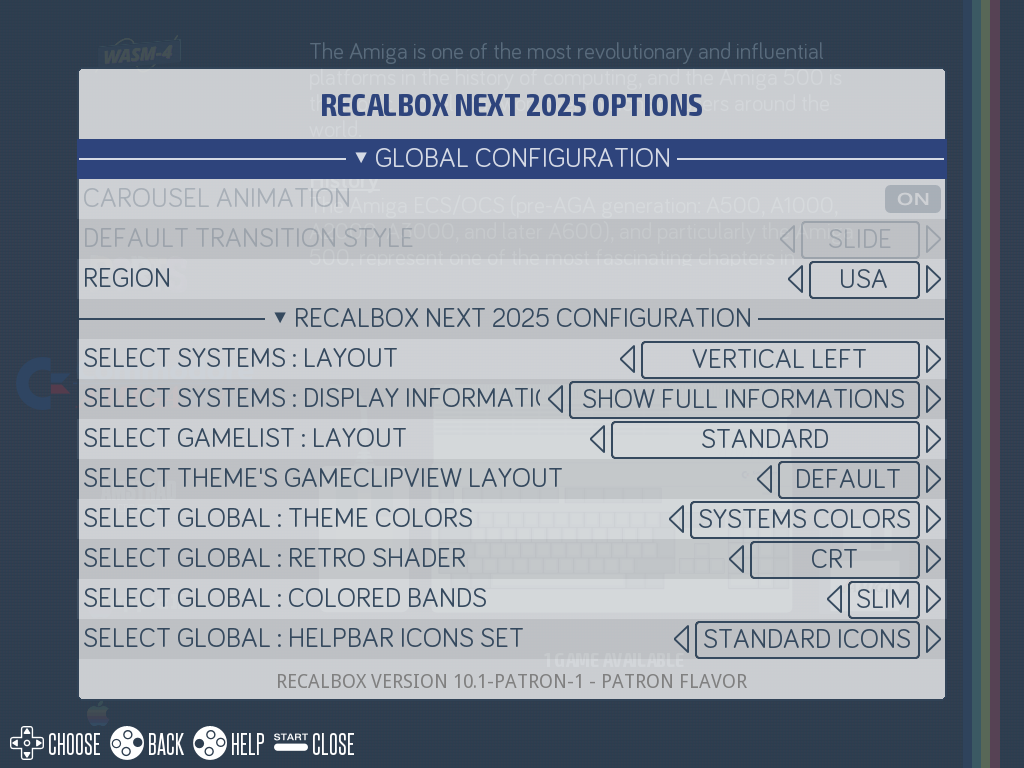
The difference is slim: the THEME menu of the interface starts with the active theme selector, while the screen opened with Y from the manager goes straight to the current theme's settings.
Any change is applied immediately, without rebooting: the theme is reloaded on the fly.
¶ The settings common to every theme
Under the GLOBAL CONFIGURATION header:
| Setting | Values | Purpose |
|---|---|---|
THEME SET |
The list of installed themes | The active theme (only in USER INTERFACE SETTINGS → THEME) |
CAROUSEL ANIMATION |
On / Off | Animate the system carousel during transitions, or not |
DEFAULT TRANSITION STYLE |
ZOOM, FADE, INSTANT |
The transition between two systems: sliding, fade to black, or no effect at all |
REGION |
Europe, USA, Japan |
The region to use for themes offering regionalised artwork or texts (console logos, system names…) |
CAROUSEL ANIMATIONandDEFAULT TRANSITION STYLEappear greyed out when the active theme enforces its own transitions — which is the case of the defaultrecalbox-nexttheme. This is not a bug: the theme has the final say.
¶ The theme's own options
Under a second header carrying the theme name (<theme name> CONFIGURATION), Recalbox lists the options declared by the theme, in the form Select <option name>.
The name, help text and values of each option come from the theme, and are shown in your language when the author translated them. A theme may expose none at all, or a dozen and a half.
¶ Example: the default recalbox-next theme
| Option | What it changes | A few values |
|---|---|---|
SYSTEMS : Layout |
The system list layout | Vertical left, Horizontal center, Horizontal bottom, Top, Wheel left |
SYSTEMS : Display informations |
The information shown on the system list | Show full informations, Show light informations, Hide informations |
GAMELIST : Layout |
The game list layout | Standard, Controls, Standard - Big Picture, Large list |
Display games information |
The game information shown (CRT/JAMMA displays) | Show games informations, Show synopsis |
SCREENSAVER : Clip style |
The game clip view layout | Detailed, Big cover, Full video |
GLOBAL : Theme Colors |
The interface colour palette | Systems Colors, Random, Blue, Green, Grey, Orange, Pink, Purple, Red, Yellow… |
GLOBAL : Retro Shader |
A retro filter over the interface (HD/Full HD) | CRT, Scanline, Honeycomb, None |
GLOBAL : Shadow |
The background gradient (CRT/JAMMA displays) | No shadow, With shadow |
GLOBAL : Colored bands |
The decorative colour bands | Slim, Fat, Hide |
GLOBAL : Helpbar icons set |
The icon set of the help bar at the bottom of the screen | Depends on the theme |
This table gives the flavour, but every theme has its own: open the menu to discover what yours offers.
Some options do not appear depending on your hardware: a theme may restrict an option to CRT/JAMMA displays, to high definition, or to TATE mode. The same theme therefore does not show the same list on a Raspberry Pi over HDMI and on a JAMMA cabinet.
¶ Where those settings are stored
Each option is stored in recalbox.conf, per theme, in the form emulationstation.theme.<theme folder>.<option name>:
emulationstation.theme.folder=recalbox-next
emulationstation.theme.region=us
emulationstation.theme.carousel=1
emulationstation.theme.transition=slide
emulationstation.theme.recalbox-next.bands=1 - Slim
emulationstation.theme.recalbox-next.colorTheme=0 - Systems Colors
Because settings are stored per theme, switching theme does not lose the settings of the previous one: you get them back untouched when you return to it.
The stored value is the raw value declared by the theme (often prefixed with an ordering number, such as 1 - Slim), not the translated label displayed on screen. If that value no longer matches anything — because the theme was updated and the option renamed, for instance — Recalbox falls back to the first available value and fixes recalbox.conf for you.
¶ Good to know
- Six legacy option names (
colorset,iconset,menu,systemview,gamelistview,gameclipview) get a translated label enforced by Recalbox (Select THEME'S COLORSET,Select THEME'S GAMELISTVIEW LAYOUT…), which overrides the title declared by the theme. Theme authors who want to keep control over the label use a different option name. - The option named
gameclipviewalso gets aDEFAULTvalue added automatically by Recalbox, which lets the interface pick the game clip view itself. - The options of a theme that is not installed are not reachable: apply the theme first.
¶ Going further
- Theme manager — browsing and installing themes.
<subset>tag — how a theme declares its options, from the authoring side.<include>tag — how a theme declares the values of an option.- Conditions — how an option gets restricted to a piece of hardware or a resolution.