Netplay lets you play retro games online: you host a game on your Recalbox and other players join you over the internet (or you join theirs), just as if you were on the same couch.
Recalbox 10.1 ships a netplay overhaul:
- Online play enabled on Game Boy and Game Boy Color (
tgbdualcore). - "GameLink" over netplay: the Game Boy Link Cable is emulated across the internet — each player plays on their own console, linked to the other one.
- A synchronization mode to re-sync the two Game Boys if they drift apart during an online session.
¶ Enabling and configuring netplay
- Press
STARTto open theMAIN MENU, then enterIN-GAME SETTINGS. - Scroll down to the
NETPLAY SETTINGSsection:
| Option | Purpose |
|---|---|
NETPLAY |
switch: enables or disables netplay |
NICKNAME |
your name as shown to other players (no special characters) |
PORT |
local listening port when hosting (default: 55435) |
NETPLAY MITM |
relay server: NONE, NEW YORK, MADRID, MONTREAL, SAOPAULO |
PREDEFINED PASSWORDS |
list of 15 editable passwords to protect your sessions |
HASH ROMS → RUN |
computes your roms' fingerprints for reliable matching in the lobby |
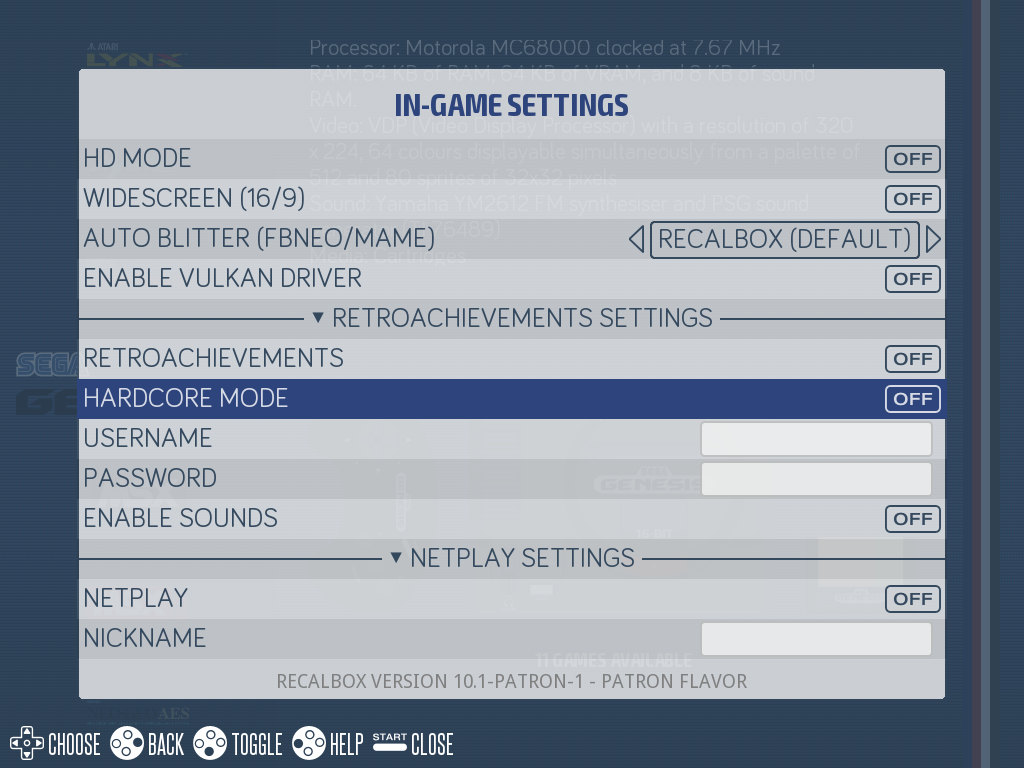
Two settings deserve your attention:
HASH ROMS: run it once (and again after adding games). Netplay requires both players to have exactly the same rom; the hash lets the lobby verify that match.NETPLAY MITM: if you cannot open a port on your internet router, pick the relay server closest to you — the connection then goes through it, with no network configuration. Otherwise leaveNONEand forward the chosen port (default55435) to your Recalbox.
¶ Hosting a game
- In a game list, select a game from a compatible system: the
Xbutton showsNETPLAYin the help bar. - Press
X: theINITIATE <game name> NETPLAY GAMEmenu opens. - Optional: pick a
CHOOSE PLAYER PASSWORD(required from players) and/or aCHOOSE VIEWER PASSWORD(required from viewers) among the predefined passwords. START GAME→START: the game launches and waits for other players to join you.
📷 Screenshot coming soon:
netplay-host.png
If no network is available, Recalbox displays "There is no network available." — check your connection before trying again.
¶ Joining a game: the lobby
- On the system list, press
Xto open theNETPLAYlobby. If Kodi is enabled with itsXshortcut, aKODI/NETPLAYmenu lets you choose betweenKODI MEDIA CENTERandNETPLAY LOBBY→OPEN. - The lobby lists sessions currently running around the world. For each one, a details panel shows:
Username(of the host),Country,Rom hash,Rom file,Core,Latency(good / medium / bad) andCan join. - Select a session (
LAUNCH;RESCANrefreshes the list): theJOIN <game name> NETPLAY GAMEmenu opens. JOIN AS PLAYER→JOIN, orJOIN AS VIEWER→WATCHto spectate without playing. If the session is protected, first select the right password inUSE PASSWORD.
📷 Screenshot coming soon:
netplay-lobby.png
You can only join a session if your rom and the core match the host's — that is exactly what the Rom hash, Core and Can join lines of the details panel verify. If the lobby shows NO GAMES OR NO CONNECTION, no session is running or your internet connection is at fault.
The duration of netplay notifications is set in
MAIN MENU→USER INTERFACE SETTINGS→POPUP SETTINGS→SHOW NETPLAY POPUPS(0 to 10 seconds).
¶ GameLink: the Game Boy Link Cable over netplay (new in 10.1)
The roms/gb/gamelink and roms/gbc/gamelink folders of your share emulate the Game Boy Link Cable: drop your two-player cable games there (Tetris, for instance), and they will launch with the tgbdual core, which emulates two Game Boys connected by the cable.
- Locally: both consoles are displayed on the same screen, one player on each controller.
- Over netplay (new in 10.1): host the game from the
gamelinkfolder (Xbutton) — you see and play console 1, the player who joins you sees and plays console 2. Each player has their own Game Boy on screen, just like with a real link cable, but over the internet.
📷 Screenshot coming soon:
netplay-gamelink.png
¶ The synchronization mode
If the two Game Boys drift out of sync during an online session, the tgbdual core offers a forced sync option: console 1's state is continuously mirrored to console 2.
Enable it from the in-game RetroArch menu (HOTKEY + B) → Core Options: option Force netplay state sync (mirrors GB1→GB2) (tgbdual_netplay_sync), disabled by default.
¶ Netplay-compatible systems
Netplay works with the following systems, only through their compatible cores (the host and the joining player must use the same core):
| System | Compatible cores |
|---|---|
| 3DO | opera |
| Amstrad CPC | cap32, crocods |
| Amstrad GX-4000 | cap32 |
| Atari 2600 | stella, stella2014 |
| Channel F | fbneo |
| ColecoVision | bluemsx, fbneo, gearcoleco |
| DOS | dosbox_pure |
| FinalBurn Neo (arcade) | fbneo |
| Famicom Disk System | fbneo, fceumm, mesen, nestopia |
| Game Boy | tgbdual (new in 10.1), mgba, sameboy |
| Game Boy Color | tgbdual (new in 10.1), mgba, sameboy |
| Game Boy Advance | mgba, gpsp |
| Game Gear | picodrive |
| GameCube | dolphin, dolphin-gui |
| MAME | mame0258, mame0278, mame2000, mame2003, mame2003_plus |
| Master System | fbneo, gearsystem, genesisplusgx, picodrive |
| Megadrive | fbneo, genesisplusgx, genesisplusgx_ex, genesisplusgxwide, picodrive |
| Mega-CD | genesisplusgx, picodrive |
| Mr.Boom | mrboom |
| NES | fbneo, fceumm |
| Neo-Geo | fbneo, geolith, mame2000, mame2003, mame2003_plus, mame2010, mame2015 |
| Neo-Geo CD | geolith |
| PC Engine | mednafen_pce_fast, mednafen_supergrafx |
| PC Engine CD | mednafen_pce_fast, mednafen_supergrafx |
| PC-FX | mednafen_pcfx |
| Saturn | mednafen_saturn |
| Sega 32X | picodrive |
| SG-1000 | fbneo, gearsystem, genesisplusgx, picodrive |
| Super Nintendo | bsnes, bsneshd, mednafen_supafaust, mesen_s, snes9x, snes9x2002, snes9x2005, snes9x2010 |
| Sufami Turbo | snes9x |
| SuperGrafx | mednafen_supergrafx |
| Thomson MO/TO | theodore |
| TIC-80 | tic80 |
| WASM-4 | wasm4 |
| Wii | dolphin, dolphin-gui |
GameCube and Wii use Dolphin's own netplay system (with your Recalbox
NICKNAME), configured from the Dolphin interface — Dolphin sessions do not appear in the Recalbox lobby.
¶ Frequently asked questions
The X button does not offer netplay on my game? Check that NETPLAY is enabled in IN-GAME SETTINGS, and that the game's system is listed in the table above.
The lobby shows "No Match" on the rom? Your rom is not identical to the host's (different dump). Also run HASH ROMS if you never did, so the check is reliable.
Nobody can join me when I host? Forward the PORT (default 55435) to your Recalbox on your internet router, or pick a NETPLAY MITM relay server close to you.
My online Game Boy session drifts between the two players? Enable Force netplay state sync in the tgbdual core options (RetroArch menu, HOTKEY + B).