The composite output of the Raspberry Pi lets you display Recalbox on any CRT television with a single cable. It is the cheapest solution — and by far the poorest: the composite signal mixes luminance and chrominance, which gives a blurry picture and bleeding colours.
For a sharp and faithful RGB picture on a CRT television, prefer a Recalbox RGB Dual. The Recalbox RGB Dual 2 actually offers a built-in composite output, enabled straight from its menu (
FORCE COMPOSITE) — with no file to edit.
¶ The cable
The Raspberry Pi (3, 4/400, 5/500, Zero 2 with an adapter) carries composite video and sound on a 4-pole 3.5 mm jack. You therefore need a 3.5 mm jack to 3 × RCA cable.
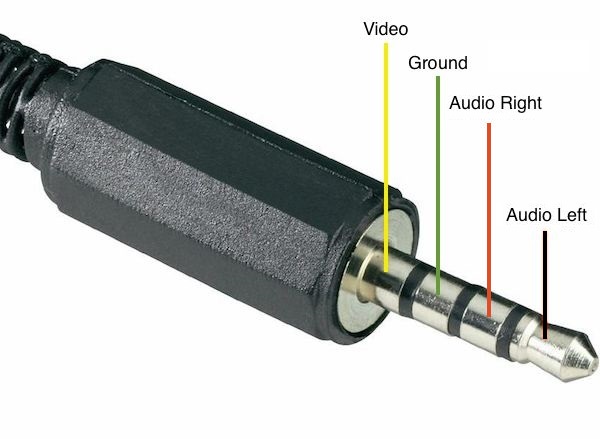
Mind the pinout: on cables sold for camcorders, video often sits on the red plug (right audio) instead of the yellow one. Since that cable type is not standardized, checking it with a multimeter saves a lot of trouble — swapping ground and video gives a jittery black and white picture.
A Recalbox composite RCA cable with the right pinout is available on the shop.
¶ Enabling the composite output
The Raspberry Pi composite output is not active by default: it has to be requested explicitly at boot.
¶ 1. In config.txt
Open the config.txt file on the [RECALBOX] partition and find the line matching your machine (there is one per board, in a [pi3], [pi4], [pi5]… section):
dtoverlay=vc4-kms-v3d,cma-512
Replace it with:
dtoverlay=vc4-kms-v3d,composite=1
On Raspberry Pi 4, also comment out the following line:
#hdmi_enable_4kp60=1
That file is rewritten on every Recalbox update: you will have to redo those two changes after each version upgrade.
¶ 2. In recalbox-user-config.txt
This second file is never overwritten. Add to it the standard matching your television, a single line among:
sdtv_mode=0    # standard NTSC
sdtv_mode=1    # Japanese NTSC (no pedestal)
sdtv_mode=2    # standard PAL
sdtv_mode=3    # Brazilian PAL (525/60, different subcarrier)
In Europe, that is sdtv_mode=2.
Then add the line that forces the composite output even when an HDMI screen is plugged in:
hdmi_ignore_hotplug=1
To improve sound on the jack output, you may enable the experimental audio driver:
audio_pwm_mode=2
Your recalbox-user-config.txt then looks like this:
sdtv_mode=2
hdmi_ignore_hotplug=1
audio_pwm_mode=2
Reboot: the picture shows up on the television.
¶ Everything is slow over composite
audio_pwm_mode=2 improves sound but can noticeably slow the system down, especially on the least powerful machines. If you notice stutter, go back to the default mode:
audio_pwm_mode=0
¶ Adjusting the picture
Composite being limited to 240p/480i, the interface may overflow the screen. Set the interface and game resolutions as described in the video configuration guide, and use the geometry settings of your television.
Need help? Join the Recalbox Discord.