High-resolution texture packs (or "hi-res" packs) are fan-made collections that replace a game's original, heavily pixelated textures with redrawn high-definition versions. The technique goes back to the Rice Video plugin, the first to let anyone extract a N64 game's textures, rework them and inject them back — since then, hundreds of packs have appeared for the console's classics.
¶ Before you start
- Make sure your rom matches the pack: most packs target one precise revision (often the US
(U)version, rarely the European(E)one). The pack'sreadmefile says which. - The pack must come as a folder of
.pngfiles. Packs delivered as a single.htsfile cannot be installed this way. - Plan for the space: a full pack often weighs several hundred megabytes.
¶ 1. Copy the pack onto the Recalbox
Put the pack folder into:
/recalbox/share/bios/Mupen64plus/hires_texture/ROM_INTERNAL_NAME/
The folder must be named exactly like the rom's internal name, not like the file name (see below for how to find it).
┣ 📁 bios
┃ ┣ 📁 Mupen64plus
┃ ┃ ┣ 📁 hires_texture
┃ ┃ ┃ ┣ 📁 MARIOKART64
┃ ┃ ┃ ┃ ┣ 🗒 MARIOKART64#12AB34CD#0#2_all.png
┃ ┃ ┃ ┃ ┣ 🗒 …
¶ 2. Run the game with the right core
High-resolution textures only work with the GLideN64 engine, that is to say the LIBRETRO MUPEN64PLUS_NEXT core.
- Select the game and press
START. - Enter
EDIT GAME→RUN WITH. - Choose
LIBRETRO MUPEN64PLUS_NEXT. - Close the menus.
¶ 3. Enable high-resolution textures
- Start the game.
- Open the RetroArch menu with
HOTKEY+B. - Go to
Quick Menu→Options→GLideN64category. - Set
Use High-Res texturestoTrue(the option is off by default). - Go back, choose
Resume, then quit the game and start it again.
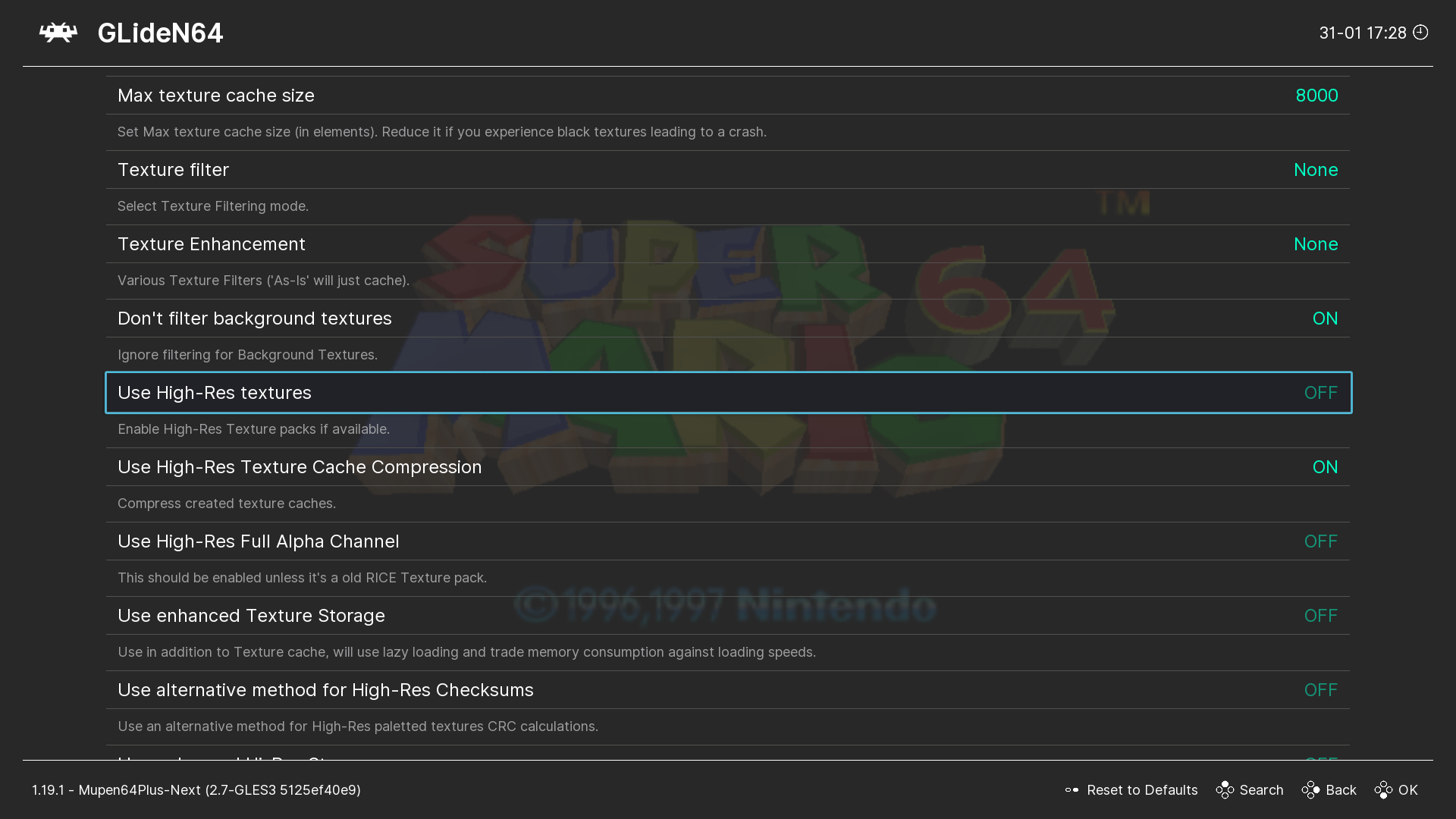
If the rom and the pack match, the game starts with HD textures. Two neighbouring options can help:
Use High-Res Full Alpha Channel: turn it on except for older Rice-format packs.Use High-Res Texture Cache Compression: on by default, leave it alone (it dramatically reduces memory usage).
¶ Troubleshooting
¶ A game without a texture pack no longer starts
Start a game that does have a pack, turn Use High-Res textures off in the RetroArch menu, then exit. If the problem persists, reset the emulator configuration from the Recalbox menu.
¶ The pack is installed but nothing changes
Nine times out of ten this is a folder name problem. Many packs ship with the correct name… but not all of them. The folder name must be the rom's internal name, the one written in its header — not the file name.
The file is called
Mario Kart 64 (USA).v64, but the rom's internal name isMARIOKART64.
¶ Finding a rom's internal name
On a Windows PC, the Tool64 utility shows it in a few clicks:
- Start Tool64.
File→Open, then select your roms folder.- Right-click the rom →
Rom Properties…. - Read the
Rom Nameline: that is the internal name.
📷 Screenshot to come:
n64-tool64-rom-properties.png
¶ See also
- Several texture packs for the same game.
- Nintendo 64 — available cores and how to switch between them.