The gamecon_gpio_rpi driver lets you wire retro console controllers straight to the GPIO header of a Raspberry Pi. Up to four controllers can be used at once, among the following types:
- NES controller;
- SNES controller;
- PSX / PS2 controller;
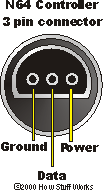
- N64 controller;
- GameCube controller.
This driver is derived from the original Gamecon but uses different parameters and a different pinout: there is no guarantee that it will work, and you proceed at your own risk.
This tutorial does not apply to the Raspberry Pi 5, whose GPIO is not supported. It covers the Raspberry Pi 3, 4 and Zero 2.
¶ Wiring principles
Pins P1-01 (3.3 V) and P1-06 (ground) power every connected controller: they are shared. Even though NES and SNES controllers nominally run on 5 V, they cope with 3.3 V — so no level shifter is needed on the data lines.
The available current (around 50 mA) is enough for four controllers, provided you use a good quality Raspberry Pi power supply to avoid voltage drops.
The data pins P1-03, P1-05, P1-07 and P1-26 (GPIO 0, 1, 4 and 7) are independent: each controller uses exactly one of them.
- Pins P1-03 and P1-05 map to GPIO 2 and GPIO 3 on revision 2 boards — take this into account when configuring the driver.
- Pins P1-19 and P1-23 (GPIO 10 and 11) are the signals shared by all NES / SNES controllers.
- Pins P1-08, P1-10 and P1-12 (GPIO 14, 15 and 18) are the signals shared by all PSX / PS2 controllers.
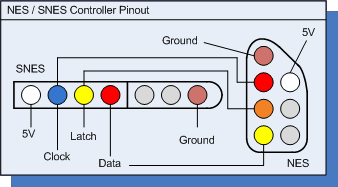
¶ NES and SNES controllers
| Raspberry Pi pin | SNES controller pin | NES controller pin |
|---|---|---|
| P1-01 (3.3 V) | 1 (power, 5 V) | 1 (power, 5 V) |
| GPIO 10 | 2 (clock) | 5 (clock) |
| GPIO 11 | 3 (latch) | 6 (latch) |
| GPIOxx | 4 (data) | 7 (data) |
| P1-06 (GND) | 7 (ground) | 4 (ground) |
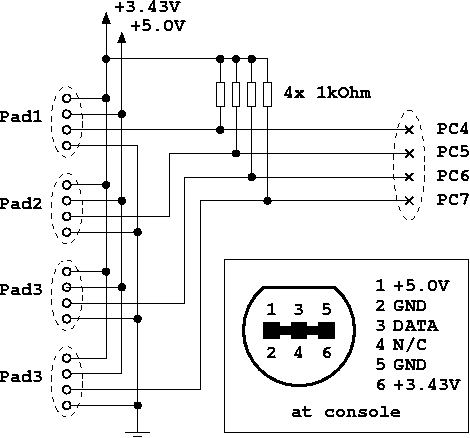
¶ GameCube controllers
| Raspberry Pi pin | GameCube controller pin |
|---|---|
| P1-01 (3.3 V) | 6 (power, 3.43 V) |
| GPIOxx | 3 (data) |
| P1-06 (GND) | 2 and 5 (ground) |
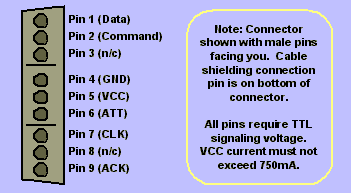
¶ PSX / PS2 controllers
| Raspberry Pi pin | PSX / PS2 controller pin |
|---|---|
| P1-01 (3.3 V) | 5 (VCC) |
| GPIO 14 | 2 (command) |
| GPIO 15 | 6 (ATT) |
| GPIO 18 | 7 (CLK) |
| GPIOxx | 1 (data) |
| P1-06 (GND) | 4 (ground) |
In every table, GPIOxx is the data pin specific to that controller, picked from the independent pins and declared in the driver configuration below.
¶ Configuring the driver
In recalbox.conf, enable the driver:
controllers.gamecon.enabled=1
The Gamecon driver is only loaded if
controllers.gpio.enabledandcontrollers.db9.enabledare both0. These three GPIO drivers are mutually exclusive.
Then declare the controller type connected to each data pin, in the order <pad1/GPIO0>,<pad2/GPIO1>,<pad3/GPIO4>,<pad4/GPIO7>,<pad5/GPIO2>,<pad6/GPIO3>:
controllers.gamecon.args=map=0,0,1,6
The available types:
| Value | Controller |
|---|---|
0 |
nothing connected |
1 |
SNES |
2 |
NES |
3 |
GameCube |
6 |
N64 |
7 |
PSX / PS2 |
8 |
PSX DDR (dance mat) |
9 |
SNES mouse |
The map=0,0,1,6 example declares an SNES controller on GPIO 4 and an N64 controller on GPIO 7.
pad1andpad2are only used on a revision 1 board;pad5andpad6only on a revision 2 — on those boards, setpad1andpad2to0.- PSX / PS2 controllers need a pull-up resistor:
pad5(GPIO 2) andpad6(GPIO 3) have one built in.
The final controller index (the one emulators see) is assigned sequentially from 0, in declaration order: in the example above, the SNES pad is controller 0 and the N64 pad is controller 1.
After a reboot, check that the module was loaded:
grep CONTROLLERS /recalbox/share/system/logs/recalbox.log
¶ Extra settings
¶ Calibrating an N64 analog stick
For each N64 controller, over SSH:
jscal -s 4,1,0,0,0,6972137,6972137,1,0,0,0,6547006,6468127,1,0,0,0,536854528,536854528,1,0,0,0,536854528,536854528 /dev/input/jsX
Replace jsX with your controller's device (js0, js1…).
¶ PSX controller polling delay
The driver polls PSX controllers every 10 µs, which keeps latency to a minimum. In rare cases that is not enough for a stable read: add the psx_delay= parameter (value in microseconds, between 1 and 50) to the module arguments.
¶ Going further
The driver's original thread on the Raspberry Pi forum. Thanks to marqs for the driver, and for letting us reuse his documentation.