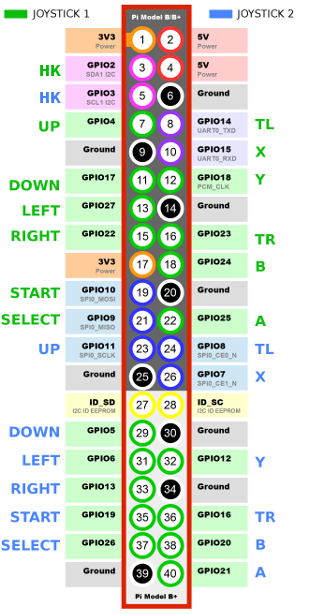
Recalbox ships the mk_arcade_joystick_rpi driver, which turns buttons wired to a Raspberry Pi GPIO header into real controllers as far as the system is concerned. If you are building a bartop, an arcade cabinet or a portable stick, you do not need to buy a USB encoder: a handful of wires is enough.
The driver handles up to two controllers, each made of a 4-way joystick and 9 buttons.
GPIO is not supported on the Raspberry Pi 5: on that board, use a USB encoder instead. This tutorial applies to the Raspberry Pi 3, 4 and Zero 2.
¶ Wiring
Take a 7-button panel laid out like this:
. ↑      Ⓨ Ⓧ Ⓛ
←  →     Ⓑ Ⓐ Ⓡ Ⓗ
  ↓
Where:
Ⓡ = right trigger = TR | Ⓛ = left trigger = TL | Ⓗ = HK = Hotkey
Each button goes between the GPIO pin assigned to it and a ground (GND) pin. No external resistor is needed: the driver enables the Raspberry Pi's internal pull-ups.
¶ Enabling the driver
In recalbox.conf, set the following key to 1:
controllers.gpio.enabled=1
Reboot: the GPIO controllers come pre-configured, both in the frontend and in the emulators. There is no need to run the controller configurator.
controllers.gpio.enabled=1takes priority overcontrollers.db9.enabledandcontrollers.gamecon.enabled: neither of those will be loaded while the arcade driver is active.
¶ Choosing the number of controllers and the pins
The controllers.gpio.args key passes parameters to the driver. By default:
controllers.gpio.args=map=1,2
map=1 declares a single controller, map=1,2 declares two (standard pinouts 1 and 2).
For a custom pinout, use map=5 (one controller) or map=5,6 (two controllers) and give the GPIO list in the order Y-, Y+, X-, X+, start, select, a, b, tr, y, x, tl, hk:
controllers.gpio.args=map=5,6 gpio=4,17,27,22,10,9,25,24,23,18,15,14,2 gpio2=11,5,6,13,19,26,21,20,16,12,7,8,3
Two things to watch out for:
- the numbers are GPIO numbers (BCM numbering), not physical pin numbers on the header;
- a value of
-1disables the matching input (for instance if your panel has no Hotkey button).
¶ MCP23017 expansion
The driver can also read buttons wired to one or two MCP23017 chips on the I²C bus, and mix them with directly wired buttons. The I²C addresses are then declared in map:
controllers.gpio.args=map=0x20,0x21,5,6 gpio=4,17,27,22,10,9,25,24,23,18,15,14,-1 gpio2=11,5,6,13,19,26,21,20,16,12,7,8,-1
¶ Checking that it works
After a reboot, check the inputs with the built-in controller tester, or over SSH with sdl2-jstest --list.
If nothing shows up, check the logs to confirm the module was loaded:
grep CONTROLLERS /recalbox/share/system/logs/recalbox.log