Connecting your Recalbox to the network lets you add games from your computer, scrape artwork for your games, play online (netplay) and access the web manager.
¶ Wired (RJ45)
Plug in the network cable: that's it. Recalbox is configured automatically (DHCP).
¶ Wi-Fi
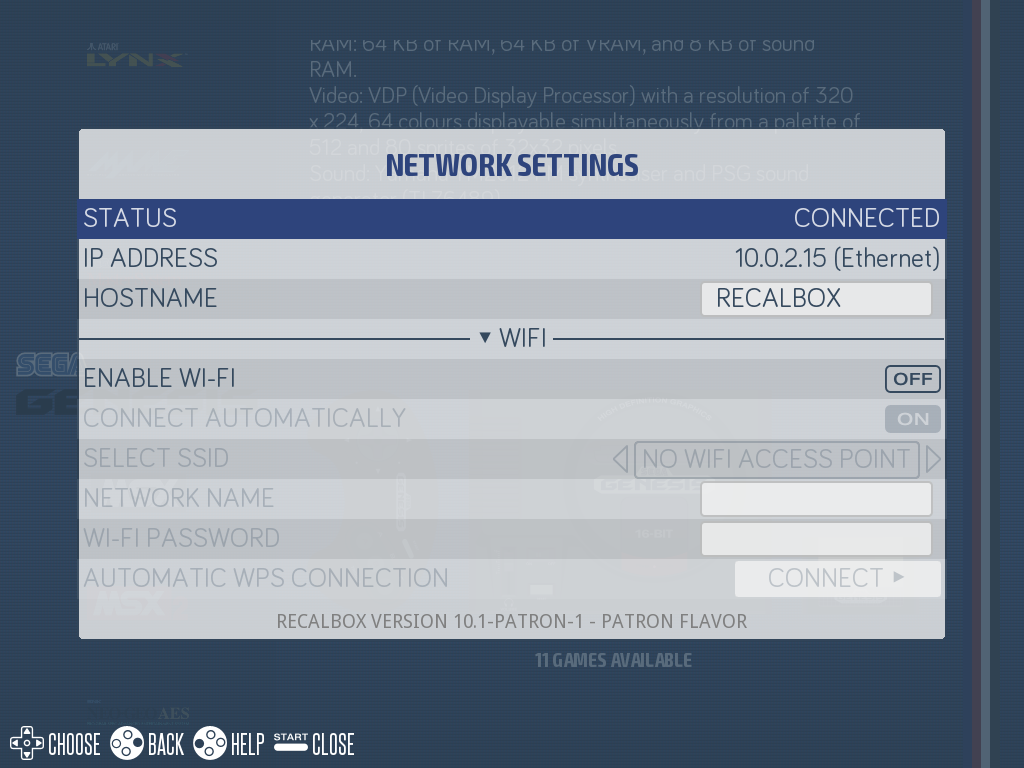
Press START → NETWORK SETTINGS, then switch ENABLE WIFI to ON.
¶ Method 1 — Pick your network
- Select your network in
SELECT SSID(or type its name inWIFI SSIDif it is hidden). - Enter your password in
WIFI KEY. - After a few seconds, the IP address appears in the menu: you are connected.
📷 Screenshot coming soon:
network-wifi-ssid.png
¶ Method 2 — WPS (no password)
- Press the WPS button on your router (the function stays active for about 2 minutes).
- In Recalbox, select
AUTOMATIC WPS CONNECTIONat the bottom of the network menu. - The connection found is saved automatically.
📷 Screenshot coming soon:
network-wps.png
¶ Check the connection
Your Recalbox's IP address is shown in NETWORK SETTINGS — write it down, you will need it for adding games and SSH access. Recalbox can also be reached by name: \\RECALBOX (Windows) or recalbox.local (macOS/Linux).
¶ For advanced users
The network can also be configured in recalbox.conf:
wifi.enabled,wifi.ssid,wifi.key— the key is encrypted on first boot.- Multiple networks: declare up to two extra networks with
wifi2.ssid/wifi2.keyandwifi3.ssid/wifi3.key— handy for a Recalbox that travels between several places (home, workshop, friends' houses…). Recalbox connects to the first available network. - Static IP:
wifi.ip,wifi.netmask,wifi.gateway,wifi.nameservers(leave commented out to stay on DHCP).