RetroAchievements is a community platform that adds achievements to your retro games: take on challenges in your favorite games, earn points and compete with other players. Recalbox connects to it directly: link your account and achievements unlock in-game, with — new in Recalbox 10.1 — a notification sound on every unlock.
¶ Create an account
- Go to retroachievements.org and create a (free) account.
- Keep your username and password at hand: you need them to enable the feature in Recalbox.
¶ Enable RetroAchievements in Recalbox
- Press
STARTto open theMAIN MENU, then enterIN-GAME SETTINGS. - Scroll down to the
RETROACHIEVEMENTS SETTINGSsection and fill in:
| Option | Purpose |
|---|---|
RETROACHIEVEMENTS |
enables the feature (ON) |
HARDCORE MODE |
"original conditions" mode (see below) |
USERNAME |
your retroachievements.org username |
PASSWORD |
your retroachievements.org password |
ENABLE SOUNDS |
new in 10.1 — plays a sound on RetroAchievements notifications (achievement unlocked) |
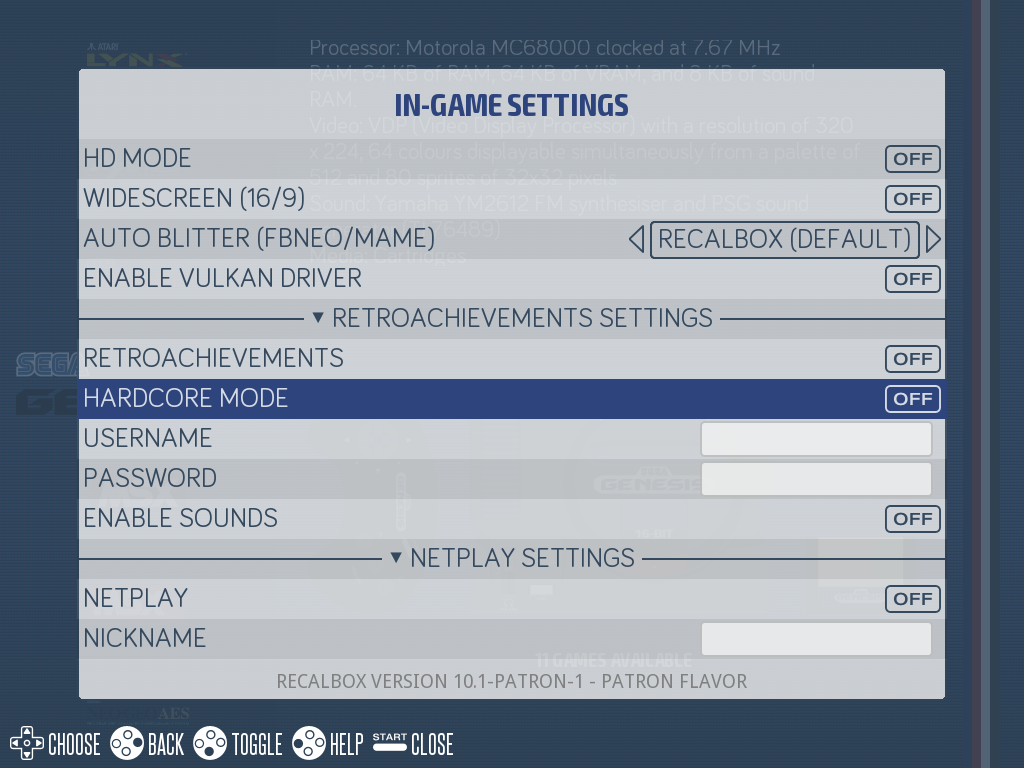
Achievements are then active in every compatible game: a notification pops up in-game whenever you unlock an achievement (with a sound if ENABLE SOUNDS is on), and your progress is saved to your retroachievements.org account.
¶ Hardcore mode
HARDCORE MODE disables all emulator conveniences: save states, rewind, cheats… You play under the original console's conditions and have to beat the game the old-fashioned way.
As a reward, every achievement unlocked in hardcore earns double points: the standard achievement plus its hardcore version.
In hardcore mode you cannot save or reload your game at any time — think about it before enabling it on a long RPG!
¶ Via recalbox.conf
The same settings exist in recalbox.conf:
global.retroachievements=1
global.retroachievements.hardcore=0
global.retroachievements.username=YourUsername
global.retroachievements.password=YourPassword
## Notification sounds (new in 10.1, key written by the menu)
global.retroachievements.sounds=1
In
recalbox.conf, escape special characters (#,;,$) in your password with a backslash:$becomes\$.
¶ Compatibility
¶ Emulators
RetroAchievements works with libretro (RetroArch) cores: Recalbox enables it on about fifty compatible systems — the 8/16-bit consoles and handhelds (NES, SNES, Mega Drive, Game Boy…), PlayStation 1 and 2, Nintendo 64, DS, Dreamcast, Saturn, arcade (MAME, FBNeo, Neo-Geo)… Emulators that do not run through RetroArch are not supported.
Per-emulator details are kept up to date in the official RetroAchievements documentation.
¶ Games and roms
Check the game list to see whether a title has achievements. For each game, only certain rom versions are recognized (identified by file hash): prefer No-Intro roms, with US roms having the best coverage. The list of recognized files ("Supported Game Files") is available on each game's page on retroachievements.org.
¶ View your achievements in-game
- In-game, open the RetroArch menu with
HOTKEY + B. - Enter
Achievements: the game's achievement list and their status are displayed. - To resume playing, go back with
Athen selectResume.
¶ Frequently asked questions
No achievement unlocks in my game? Check that the game runs on a compatible RetroArch core, that the game has achievements, and that your rom version is among the recognized files (game page on retroachievements.org).
My rewind and save states stopped working? Check HARDCORE MODE first: when it is on, it deliberately disables rewind, save states and cheats inside the emulator.
Does demo mode unlock achievements? No: RetroAchievements is automatically disabled during screensaver game demos.
I can't hear the notification sounds? Enable ENABLE SOUNDS in IN-GAME SETTINGS > RETROACHIEVEMENTS SETTINGS (off by default).
My password contains #, ; or $? In the menu, type it as is; in recalbox.conf, escape those characters with a backslash.