On some systems, Recalbox offers two image-enhancement options:
- HD MODE, which increases the internal rendering resolution of compatible 3D emulators (sharper image, less aliasing);
- WIDESCREEN (16/9), which enables the 16:9 hacks of compatible emulators to fill your whole screen without distorting the image.
HD mode is available on PC, Raspberry Pi 5 and Steam Deck. Widescreen mode is available on PC, Raspberry Pi 4 / 400, Raspberry Pi 5 and Steam Deck.
These options are not offered on CRT screens (Recalbox RGB Dual / RGB JAMMA), with one exception: widescreen mode remains available with a Recalbox RGB Dual 2 on a 16:9 CRT TV.
HD mode and/or widescreen mode may not be 100% compatible with every game and may have an impact on performance. If emulation or performance issues appear, disable the option.
¶ Enabling HD and widescreen modes
- In the interface, press
STARTthen go toIN-GAME SETTINGS. - In the
GAMES RENDERINGsection, enableHD MODEand/orWIDESCREEN (16/9).
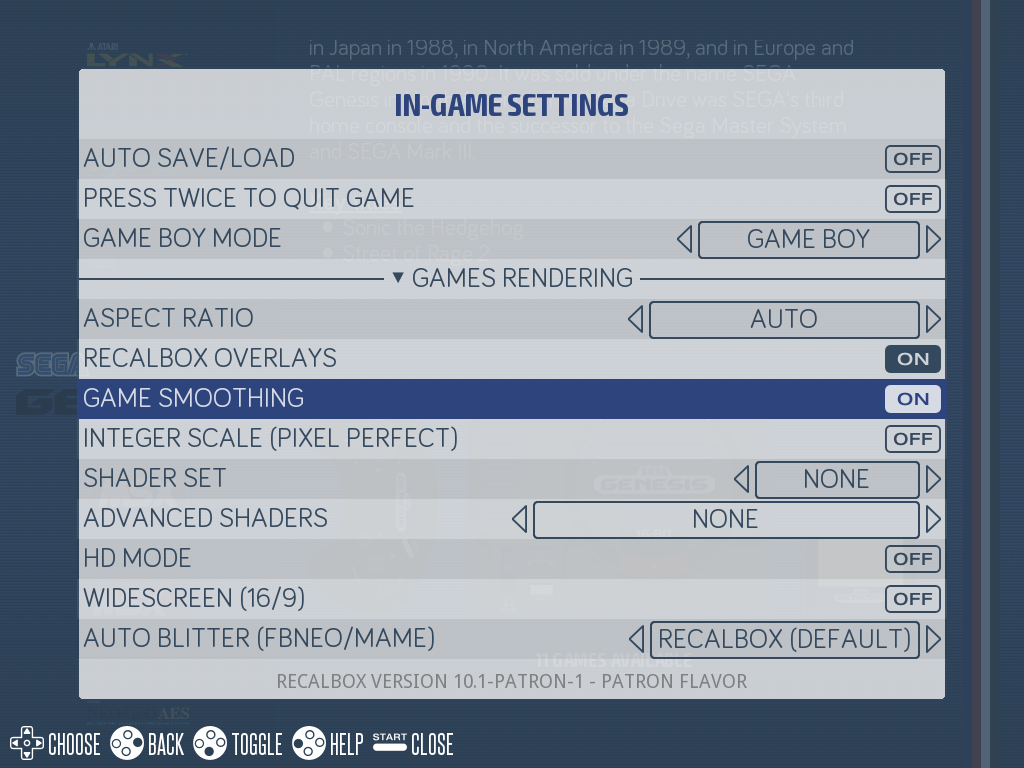
Depending on your hardware, you will see one of the two options, both, or none (see compatibility above).
¶ Via recalbox.conf
These options match the following keys in the recalbox.conf file:
## For all compatible systems
global.hdmode=1
global.widescreenmode=1
You can also set them per system; the system value takes precedence over the global one:
## Dreamcast only
dreamcast.hdmode=1
## Widescreen everywhere except on Super Nintendo
global.widescreenmode=1
snes.widescreenmode=0
¶ Compatible systems and cores used
These options change the emulator/core used to launch the game! Here are the cores used when the option is enabled:
| System | Used core | Widescreen | HD |
|---|---|---|---|
| Atomiswave | Libretro-Flycast | ✅ | ✅ |
| Dreamcast | Libretro-Flycast | ✅ | ✅ |
| Megadrive | Libretro-GenesisPlusGX-Wide | ✅ | ❌ |
| Naomi | Libretro-Flycast | ✅ | ✅ |
| Nintendo 64 | Libretro-Parallel_n64 | ❌ | ✅ |
| Playstation | Libretro-PCSX_reARMed | ❌ | ✅ |
| Saturn | Libretro-Yabasanshiro | ❌ | ✅ |
| Super Nintendo | Libretro-bsnesHD | ✅ | ❌ |
In practice, HD mode raises the core's internal resolution: 1024x768 rendering on Flycast (Dreamcast, Naomi, Atomiswave), NEON enhancement on PCSX_reARMed (Playstation), doubled resolution on Yabasanshiro (Saturn), 4x upscaling on Parallel_n64 (Nintendo 64).
¶ Good to know
- Since the option forces a specific core, any core you may have selected manually for a game or a system is ignored while the option is active.
- Widescreen mode is automatically disabled for TATE games (vertical arcade games): those games keep their original aspect ratio.
- Naomi 2 is not affected by these options.
- Save states are not always compatible from one core to another: if you toggle the option, prefer in-game saves.
Since Recalbox 10.1, libretro cores use the
glcorevideo driver — except on Raspberry Pi 3 and Pi Zero 2, which stay ongl(or Vulkan when available), and Recalbox automatically selects a 60 Hz display mode when your screen supports it: games, especially in HD, run smoother with no extra configuration.